Cleaning Looking for some feedback

DS_

Registered User
初心者/ Shoshinsha / Beginner
Joined
Sep 29, 2016
Messages
3
Reaction score
0
Country
Netherlands
Hi, recently I started cleaning and would appreciated some feedback.
I blurred the paining's frame a little since I'm terrible at redrawing and it ended up looking wonky

I'd like to hear what I did well, but also what I could improve on.

For reference, here's a page of the same manga done by another cleaner:
 

Gradonil_Ral

Manga Editor
中級員 / Chuukyuuin / Member
Joined
Jun 4, 2008
Messages
170
Reaction score
63
Gender
Male
Country
Winterfell
Welcome.

Both pages have underleveled whites. There's a lot of leftover dirt on them.

Page 1 panel 4 - you brushed over the borders a bit while you were cleaning the bubble. Always use a 100% hard brush while removing text. Otherwise there's this blurry effect around your brush that might cover some stuff even if you try to keep away from the artwork itself.

Page 2 - the gradient turns black too suddenly, it might be you overleveled the blacks a bit, try leveling less and using burn tool to remove leftover noise in the black area.
Unfortunately, underleveling the whole page might cause some problems with other places - its easy to make mistakes when burning the drawings (if you burnt the edges too roughly, they'll turn sharp, which is bad).
My suggestion is this: Make a selection over the gradient and use different levels on it, then select inverse and level the rest however you want. (Here I'd like to remind you that the whites are underleveled).

That's all I can tell you after a quick glance. I'll see about installing Photoshop back over the weekend. Perhaps I'll be able to provide a more in-depth answer then.

Watch these to find out how to easier find correct settings when leveling + how to remove leftover dirt/noise afterwards:
 

DS_

Registered User
初心者/ Shoshinsha / Beginner
Joined
Sep 29, 2016
Messages
3
Reaction score
0
Country
Netherlands
Thank you, your advice helps immensely. I'll try to apply your feedback as well as I can by redoing the pages and posting them here, then you'll be able to see if I understood correctly. I've never used the burn tool before, so that might be a bit of a challenge. I'll try to work on it as soon as possible (probably this weekend, maybe the one after).
I'm using photoshop CS2 by the way.

Thanks again!
--- Double Post Merged, , Original Post Date: ---
Welcome.

Both pages have underleveled whites. There's a lot of leftover dirt on them.
...
That's all I can tell you after a quick glance.
I redid the pages while following your advice.
Here's the first page:
And here's the second one:
I wasn't able to clean the borders of the individual panels, so I left them alone. Do you know a fast way to do this? I tried burning, but it took too long and looked messy.

Thanks again for your help!
 
Last edited:

Mana Light

Registered User
下級員 / Kakyuuin / Jr. Member
Joined
Dec 2, 2014
Messages
50
Reaction score
20
Gender
Male
Country
Vietnam
First
This is public raws. the size is small.
Don't use the way of QC in this video. It is for cleans from HQ mag raws. And even it is mag raws, only leveling in this video for checking dust can be used. the other not. We don't QC like that for mag cleans.

Second.
This is public raws. the size is small.
So we don't need to make it black and white completely. Has some dust in black matter is fine and has some dust in blakc matter is fine as well.
Use your sense.

Third
This is public raws. the size is small.
Don't denoise the page directly and it will cause lost details. Your page will be blurry.

Fourth
Normally for raws that has big size (>= 2000 px high), we can resize to 8000 px high and level.
But the size is small.
So don't resize, level at current size.
Don't need to make it black and white completely. You can use our eyes to check. Level grey 1.15 or something that is similar to have details in black matter again a bit.

Here is the steps to clean it.
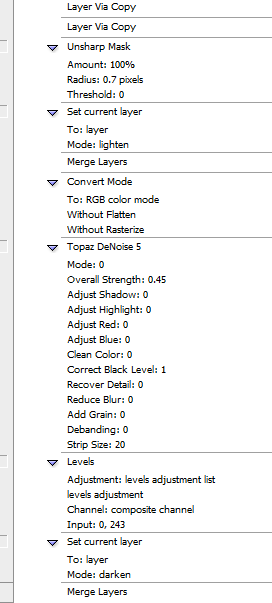
1. Duplicate layer then do those steps one time. It is [Complement Pattern] (denoise indirectly)

2. Level at current size.


It has dust when we check. Yes. But when you use your "eyes", if you don't zoom, it is very hard to see.the clean is fine even with dust.
Don't level it too black or too white. just enough for black and enough to reduce most visible dusts in white matter. use your eyes.
Because we denoise indrectly, the black is already easier to level.
3.
Here is the result.


Your screen maybe is different from my screen. It is harder for my screen to see dusts by normal eyes.
So maybe you have to level white just a bit more. Don't do it too much. It will cause lose details. You can also use blur > surface blur a bit before leveling to reduce dusts if you see the result could be better.
You can also use dodge tool do make dusts faint but keep it mind, you don't have to make it pefect.
This is public raws. the size is ...

Read more about cleaning
[Sense-scans] Tankoubon/Volume Raw Cleaning test instructions (it is about HQ and MQ tank raws and test as well)
[Chocolat Vanilla] Cleaning guide - How to clean properly? (find complement pattern)
https://mangahelpers.com/forum/threads/editing-help-center.3005895/

 
Last edited:

DS_

Registered User
初心者/ Shoshinsha / Beginner
Joined
Sep 29, 2016
Messages
3
Reaction score
0
Country
Netherlands
Thank you for the advice. What do you think of my second set of cleaned pages? Do you think they are overlevelled/too white?

I didn't use all of the methods shown in the video by the way.

My M.O. is:
- rotate & crop
- Adjust levels (use grey arrow slided all the way to the right and left for reference. Similar to what's done in the video with brightness & contrast)
- Remove text with pencil or clone stamp
- Do some extra cleaning. How much I do depends on the amount of time I have.
- Resize (usually height ~1410 to 1400 pixels)

I don't mess with brightness/contrast but only use the grey arrow with levelling, just like you do.

By the way, what do you mean with "private scans"?
 

Mana Light

Registered User
下級員 / Kakyuuin / Jr. Member
Joined
Dec 2, 2014
Messages
50
Reaction score
20
Gender
Male
Country
Vietnam

here is cleans for comparison. you can see your cleans is blurry.

so it is blurry because you rotated it. with small size, don't rotate raws, it will make page blurry. public raws is scanned with auto straighten. it was already rotated and cropped by scanner, so we don't have to rotate it again.

actually, i recommend you to buy digital for raws. don't have to clean and have intermediate quality. save times and can do other things,

for example


http://puu.sh/rt5XI/7624b90007.jpg
http://puu.sh/rt5Yn/31ffc55ab2.jpg

313 yen
www.amazon.co.jp/3-ebook/dp/B0093GCJ56

private scans are usually HQ scans (raws) that we have to pay for it. also because we pirated manga from author and publisher so those raws should be private.
aslo, you should read this.
[MTO] The Fastest Way To Clear Texts Inside Your Bubbles (not recommend ver2)
https://mangahelpers.com/forum/threads/editing-help-center.3005895/
 
Last edited:
Top